

Opening an account is the first step for UK players who want to explore Lucky Block Casino’s online games and promotions. Registration is usually straightforward, but it is worth taking a few minutes to check the site, understand its requirements and enter accurate details. This guide explains the typical sign-up process, what to prepare, and what to check before depositing. The exact screens and available services can change, so use the current information shown on the casino’s official website.
Before you register
Start by confirming that the casino is available to you and that its terms permit players in your location to sign up. Online gambling rules differ between countries, and a brand’s availability does not by itself confirm that it is licensed or authorised to serve UK residents. Check the operator’s legal information, licence details, responsible-gambling tools and withdrawal conditions before creating an account.
You should also be of legal gambling age. In Great Britain, online gambling is restricted to people aged 18 or over. Do not use another person’s details, payment method or account. Casinos may verify identity and payment ownership, and mismatched information can delay a withdrawal or lead to restrictions under the operator’s terms.
Have your details ready
- A current email address and a phone number you can access.
- Your legal name, date of birth and residential address.
- A secure password that you do not use on other websites.
- A payment method registered in your own name, if you later choose to deposit.
Some websites request additional information during registration; others ask for it during verification. Enter details exactly as they appear on your identity documents. If a form asks for a country or currency, check the options carefully rather than selecting an inaccurate answer to get past the form.
Lucky Block Casino registration steps
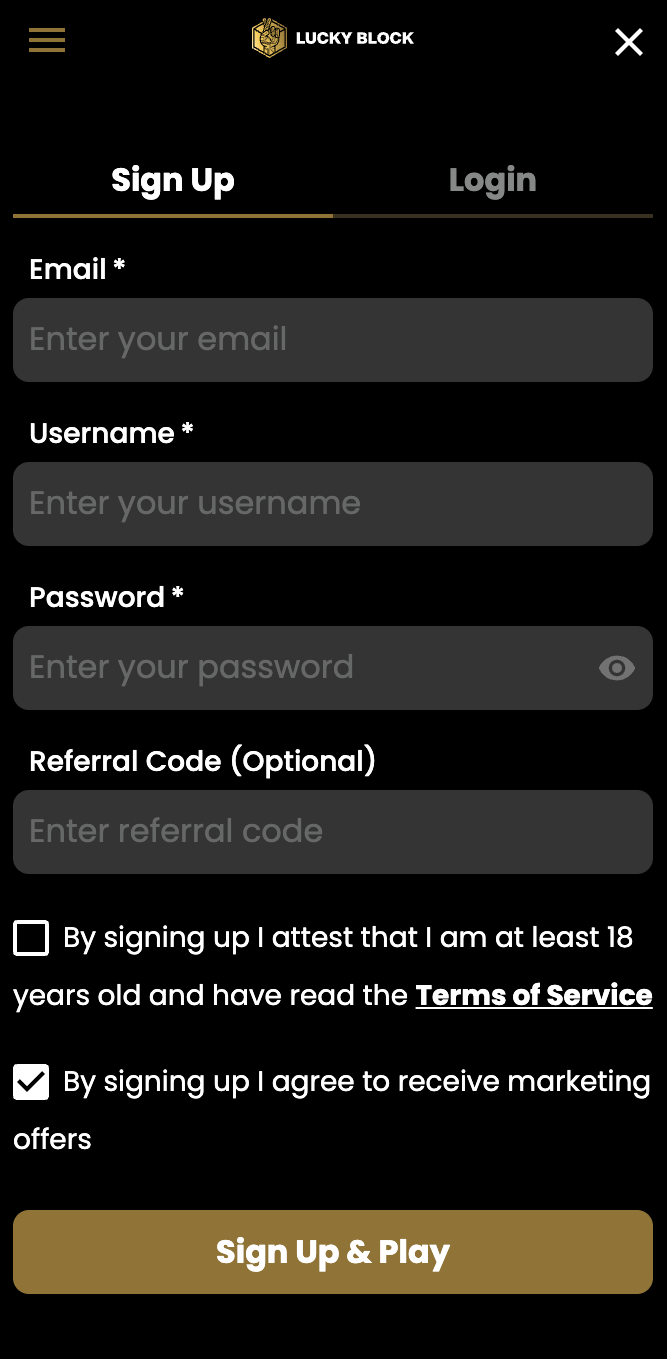
Open the official website
LuckyblockcasinoUK Online:
Find the casino’s official site and check the address bar before entering personal information. Avoid links in unsolicited messages, lookalike domains and adverts that promise guaranteed winnings. A secure connection is useful, but the padlock icon alone does not prove that a website is legitimate or appropriately licensed. Review the site’s operator and regulatory information separately.
Select the sign-up option
Choose the registration, join or create-account button. The wording and layout may differ between desktop and mobile. If the site presents promotional offers during sign-up, read the associated terms before opting in. A bonus can come with wagering requirements, game restrictions, a maximum cash-out or a time limit.
Complete the registration form
Fill in the requested personal details, including your name, birth date, address and contact information. Use your real details and check for typos before continuing. If the form asks you to select a username, choose one that does not reveal sensitive information. Never include your full date of birth, address or banking details in a public username.
Create and protect your password
Set a strong, unique password. A longer phrase with a mix of words, numbers and symbols is generally easier to remember than a short, predictable combination. Do not reuse your email password. If the casino offers two-factor authentication or other account-security controls, consider enabling them and keep recovery details private.
Read and accept the terms
Before submitting the form, review the terms and conditions, privacy notice and any bonus rules relevant to your choices. Pay particular attention to age and location requirements, account limits, verification, withdrawal procedures and circumstances in which an account may be restricted. Tick consent boxes only when you understand what they cover; promotional emails should not be confused with essential account notifications.
Verify your email or phone
The casino may send a confirmation link or one-time code. Use it promptly and make sure the message comes from the expected sender. If it does not arrive, check your spam folder, confirm that you entered the address correctly, and use the site’s resend option. Do not share a verification code with anyone claiming to be support.
Complete identity checks when requested
Verification helps an operator confirm age, identity, address and payment ownership. The casino may request documents such as an identity card or passport, proof of address, or evidence about a payment method. Submit documents only through the official account area or a verified support channel. Make sure images are clear and current, and do not alter information in a way that could make a document misleading.
Set limits before playing
Once the account is active, look for deposit, loss and session limits, time reminders, cooling-off options and self-exclusion controls. Choose limits that fit your budget before making a deposit. Gambling should be treated as paid entertainment, not a way to earn money or recover losses. If it stops being enjoyable or begins to affect your finances or wellbeing, stop and seek appropriate support.
Registration checklist
| Step | What to check | Why it matters |
|---|---|---|
| Site access | Official domain, operator details and UK availability | Helps you avoid impersonation sites and understand who runs the service |
| Personal details | Name, birth date, address and contact information are accurate | Inaccuracies may cause verification or payment problems |
| Terms | Account rules, bonus conditions and withdrawal requirements | Explains restrictions that may apply to play and cash-outs |
| Security | Unique password and available account protections | Reduces the risk of unauthorised access |
| Safer play | Deposit and time limits, breaks and self-exclusion tools | Helps keep gambling within personal boundaries |
After registration: deposits and withdrawals
Creating an account does not require you to deposit immediately. If you decide to fund it, check the minimum and maximum amounts, processing times, fees and supported payment methods. Use a method in your own name and avoid borrowing money to gamble. Before confirming a transaction, make sure the amount and currency are correct.
Withdrawal rules deserve attention before your first deposit. Check whether identity verification must be completed first, whether the casino returns funds to the original payment method, and whether pending periods or transaction limits apply. Bonus funds can be subject to separate playthrough requirements, so distinguish withdrawable cash from promotional credit in your account balance.
If a payment is delayed, consult the cashier page and the casino’s stated processing times before contacting support. Keep transaction references and relevant messages. Never send card security codes, passwords or one-time login codes in response to an unsolicited request. For a dispute, follow the operator’s formal complaints process and keep a record of the steps you take.
Common registration problems
“My email link does not work.”
Check whether the link has expired, whether you are opening it in the same browser where you started sign-up, and whether the email was sent to the correct address. Request a new link through the website if available. Avoid forwarding the message to someone else, since account confirmation links can grant access to your registration process.
“The form says my details are already in use.”
You may have created an account previously or mistyped an email address. Use the password-reset route instead of making a second account. Many operators limit customers to one account, and duplicate registrations may breach the terms or complicate verification. If you cannot identify the existing account, contact support through the official website.
“My documents were declined.”
Check the reason given by the casino. A document may be expired, blurry, incomplete or inconsistent with the details on the account. Follow the operator’s instructions and submit the requested evidence using an approved secure channel. If the explanation is unclear, ask support what specific requirement has not been met; do not send extra sensitive documents without a clear request.
Frequently asked questions
Can I register on a mobile phone?
If the official website supports mobile registration, you can usually complete the form in a phone browser. Check each field carefully, especially your address and date of birth, because small screens can make mistakes easy. Use a private, trusted device and avoid public Wi-Fi when entering account or payment information.
Do I need to deposit to finish registration?
Usually, account creation and depositing are separate actions, although the precise process depends on the casino. You can review the cashier and account settings before deciding whether to play for money. Never deposit simply because a countdown, pop-up or promotional message pressures you to act quickly.
What if I change my address or phone number?
Update account details through the official profile settings or contact support if the site does not let you edit them. Keep your information current so that verification and account messages reach you. The operator may ask for evidence before approving certain changes.
Can I open another account if I forget my password?
Do not create a second account unless the casino explicitly instructs you to do so. Use the password recovery process and contact support if you no longer have access to your registered email. Duplicate accounts can create problems with bonuses, verification and withdrawals.
Final checks before you play
A smooth Lucky Block Casino registration depends on accurate details, careful reading and sensible account security. Confirm that the operator can lawfully serve customers where you live, understand the terms, and complete any verification honestly. Set limits before depositing, and remember that games of chance do not guarantee a return; If you are unsure about a licence, payment condition or account request, pause and verify it through reliable official sources before proceeding.